Compass — Dark Docs Knowledge Hub
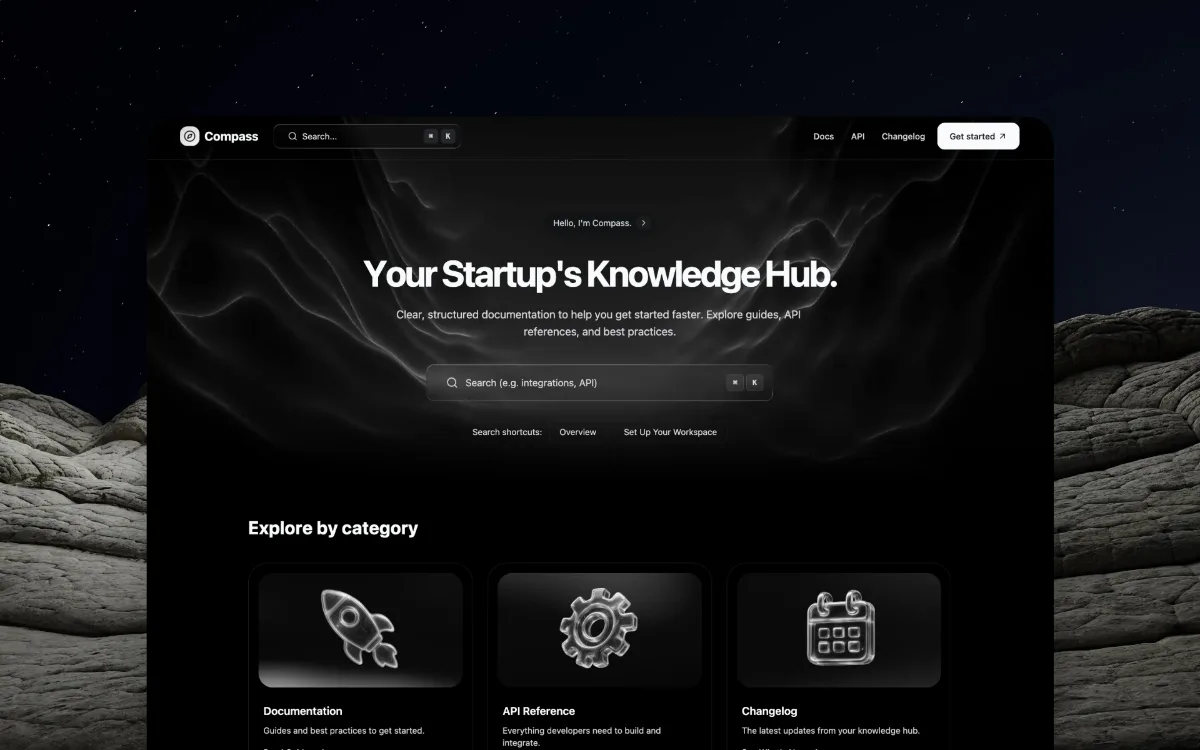
Dark Docs HubSearch-first dark documentation hub: starfield nebula hero and glossy chrome 3D category icons.
- Mood
- Helpful, structured, premium-technical. A docs hub that feels designed, not generic.
- Colors
- Near-black with a subtle blue starfield + smoky nebula, white headlines, muted gray body, chrome/silver 3D icons.
- Type
- Bold sans headline (with an apostrophe-driven line), clear subhead, a prominent search field with a keyboard-shortcut hint; strong section labels.
- Layout
- Top bar with brand + inline search + nav + CTA; centered hero (small assistant badge + big headline + subhead + large search bar + shortcut chips) over a nebula/starfield; then an "Explore by category" grid of dark cards each with a glossy chrome 3D icon (rocket, gear, calendar) and a read-more link.
- Motion
- Starfield/nebula drift, search-focus glow, hover lifts on category cards, subtle icon shimmer.
- Texture
- Starfield + smoky nebula, dark glass cards, glossy chrome 3D icons, rocky textured edges, 1px borders.
- Imagery
- Generate: a near-black starfield + smoky nebula hero backdrop and glossy chrome/glass 3D category icons (rocket, gear, calendar). Tool: kie-ai Seedream/Flux for the chrome 3D icons and nebula; build the search UI in code.
- Don't
- No light theme, no flat clipart icons, no cramped text-only docs hero. Keep the nebula + chrome-icon polish.
Use in a session
dr-documentation
Tell Claude: build [my thing] using swipe ref dr-documentation
Full recreation prompt
Recreate a landing page in the "Compass — Dark Docs Knowledge Hub" style (Dark Docs Hub). This is a VIBE / STYLE-TRANSFER task, not a clone: apply the design DNA below to MY content and section structure, do not copy the reference's copy or exact layout.

Design DNA:
- Mood: Helpful, structured, premium-technical. A docs hub that feels designed, not generic.
- Colors: Near-black with a subtle blue starfield + smoky nebula, white headlines, muted gray body, chrome/silver 3D icons.
- Typography: Bold sans headline (with an apostrophe-driven line), clear subhead, a prominent search field with a keyboard-shortcut hint; strong section labels.
- Layout: Top bar with brand + inline search + nav + CTA; centered hero (small assistant badge + big headline + subhead + large search bar + shortcut chips) over a nebula/starfield; then an "Explore by category" grid of dark cards each with a glossy chrome 3D icon (rocket, gear, calendar) and a read-more link.
- Motion: Starfield/nebula drift, search-focus glow, hover lifts on category cards, subtle icon shimmer.
- Texture: Starfield + smoky nebula, dark glass cards, glossy chrome 3D icons, rocky textured edges, 1px borders.
- Avoid: No light theme, no flat clipart icons, no cramped text-only docs hero. Keep the nebula + chrome-icon polish.

Imagery (generate real assets, do not use placeholders): Generate: a near-black starfield + smoky nebula hero backdrop and glossy chrome/glass 3D category icons (rocket, gear, calendar). Tool: kie-ai Seedream/Flux for the chrome 3D icons and nebula; build the search UI in code.

Reference exemplar: https://designrocket.io/premium-templates. Build the page around the content I give you next, faithfully channeling this aesthetic, and generate the matching imagery described above.